
Signagepost at a glance
- Software for presentation screens and digital signage
- In-house product by Computerservice Graßler
- Manual or automated content upload via local network and/or Internet
- Secondary display modes controllable through a Python API
Basic Functionality: Displaying Presentations
Displaying an ad presentation in a shop front window
People from the town of Neuhaus may already have seen the software I am presenting in this article for themselves. For Signagepost started out in my shop front window in Neuhaus. The first thing I developed was its basic functionality: Displaying presentation slide decks with ads and information. At first glance, that appears to be a simple task. Or it would be, if regular operating systems' design goal was not interactivity rather than automation: it is very easy to start a slide show in a presentation program interactively - on a computer with a keyboard and mouse, operated by a human being.
It is less easy to ensure that the system reliably displays the presentation every time the system boots. A presentation that then remains visible at all times - without being displaced by pop up notifications or application windows that raise themselves to the top. And once the system has been set up, re-installation should be automated with the system fully functional as soon as the presentation has been uploaded - even on completely different hardware. Signagepost fulfills these requirements. It takes about 20 minutes to go from a blank SSD or SD card to being fully operational. The only human action required is starting the installation process and uploading a presentation. Automation takes care of the rest. After a power outage or deliberate shutdown, the system will boot up again and launch the presentation.
Remote control: Uploading .ODP files through network share or SSH
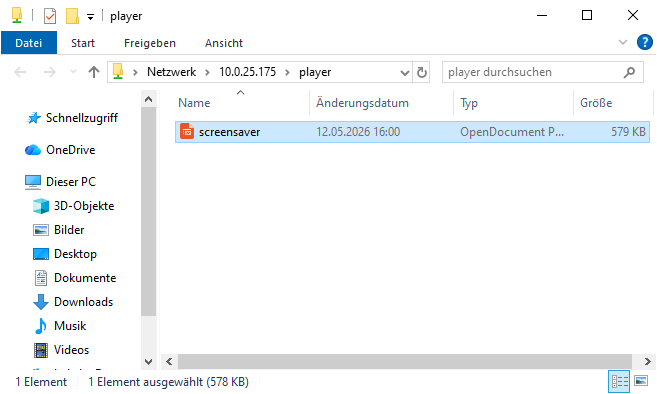
.ODP file in a Signagepost network share
Controlling signagepost is deliberately simple. There is exactly one presentation, aptly named screensaver.odp, that will be shown automatically. This presentation is a .ODP file that can be edited using Libreoffice. All animations, such as seconds until slide change are set by the user when editing the presentation. Of course, it is possible to have just one static slide without any slide transitions - in this case you'd simply create a single slide presentation without any slide transitions defined.
There are two ways to access and modify this presentation file. The simpler one is a password protected share on the computer running signagepost. This share can be used as a network drive. One edits the .ODP file containing the presentation directly on the share and saves it. Signagepost checks in regelular intervals, if the .ODP file has changed and restarts the presentation once it has.
Advanced users can use SSH to access the signagepost system and replace the .ODP file/restart the presentation. This access method is suitable for automated changes and coordinated operation of multiple Signagepost systems.
Digital Signage: Programmable Secondary Displays
Screen notification when triggering the door buzzer.
In addition to simply running a presentation, Signagepost can switch to programmable secondary displays. These are various display widgets (one with multiple lines of text, one with two column text/graphics blocks and line wrapping, one for menus and one running a full screen video player. These can be provided with content through a Python API.
In the video on the left I am using this mechanism to display a notification on the screen when the door buzzer is triggered. This turned out to be fairly helpful since my front door faces a busy street and my door buzzer does not, in fact, buzz. There is merely a faint click as it unlatches the door, so a visual cue helps with not missing the time window until the latch re-engages once more.
Platform and Hardware
In principle, Signagepost works on any Computer that runs Linux. On x86 platforms I currently use Ubuntu 24.04, that I modify for digital signage operation using my homegrown automation. I can theoretically port this to other Linux systems but this requires - costly - adaptations to the system in question. Where required I can take care of this.
The system does not require much in terms of hardware. A monitor and an Odroid M1 with 4GB of RAM and a SSD oder SD card from 16GB upwards is entirely sufficient for running presentations. If one needs more performance, most x86 mini PCs from the past 8 years should do.
Development and Modifications
Development of the Product continues as far as I see a need for modifications. For individual, customer specific modifications beyond this I charge my hourly rate C (EUR 120 pre tax at the time of this writing; see Preise).
Source code is available to the customer and they are free to make modifications in principle under two conditions: (1) support for changes deviating from the base product is not part of the license, and (2) they will have to integrate updates of the base version manually.
Support for such modified code and integration with future updates is possible at the same hourly rate as that for customer specific modifications.
Status and Target Audience
Signagepost is in early beta. This means that documentation is sparse and while the core software is a proper, installable Python module, the installation automation surrounding it consists of shell scripts. Thus it is not very suitable for installation by the user themselves. Therefore, I will only offer installed systems in the initial phase - or install the system on customer hardware myself. If the product takes off, I will develop an Ansible playbook for installation and add documentation bit by bit. For now, Signagepost is suitable for early adopters and developers interested in integrating it in their own applications. Both types of first customers will get my personal attention - not least to gather feedback and feature requests for further development.
Pricing and Availability
- Price: EUR 100 pre tax per license. One license required per computer driving a screen. Licenses remain valid indefinitely and are acquired through one-time payment of the license fee. There are no running costs - this is a one-time license fee and not a subscription. Access to updates of the base product - i.e. without customer specific modifications - to later versions is included in this license.
- The required hardware is not included and can either be provided by the customer or purchased from me.
- Discounted OEM licenses for integration into customer products are negotiable.
- The product is generally available on a B2B basis, i.e. to business customers and not to consumers. Exceptions are possible for systems I set up personally.
- Currently, Signagepost is only available directly through me. If you are interested, please contact me via email (info@computer-grassler.de) or phone (+49 (0) 9681 670 98 68).